
- 22 min read
How to Respond to Negative Feedback and Win Customers Back
Responding to negative feedback is a tough skill to master. It means swallowing your pride, acknowledging the comment quickly, genuinely empathising with the user's frustration, and then actually offering a solution.
The secret? Stop treating criticism as an attack. See it for what it is: a direct, unfiltered opportunity to show you care and to fix something that’s broken.
Why Negative Feedback Is an Uncomfortable Gift
Let’s be real—negative feedback stings. It doesn’t matter if it’s a scathing Google review, a snarky comment on X (formerly Twitter), or a detailed complaint tearing your product apart on Reddit. That initial gut reaction is almost always defensive. After all, you’ve poured your heart and soul into your work. It feels personal.
But the real damage isn’t in the criticism itself. It’s in what happens when you ignore it. Every piece of negative feedback is a raw, unfiltered data point showing you exactly where the customer experience is falling short. It's a gift, even if it’s a deeply uncomfortable one, that points out the blind spots you’d otherwise never see.
The Real Cost of Silence
Ignoring criticism creates a vacuum where your customers feel completely unheard and unimportant. That silence is far more damaging than the initial comment ever could be. When you don’t respond, you’re sending a loud and clear message: we don’t care. That can easily turn a single unhappy customer into a vocal detractor who warns their entire network to stay away.
On the flip side, a thoughtful and timely response can completely change the game. It shows accountability and proves you value customer opinions, even when the conversation is difficult. It’s a simple act, but it’s how you build unshakable trust.
"Your most unhappy customers are your greatest source of learning." - Bill Gates
This shift in perspective is everything. Instead of a problem to be managed, feedback becomes a direct line to making your brand stronger.
Turning Critics Into Advocates
Picture this: a user posts on an industry forum about a frustrating bug they found in your software. If you ignore it, you’re just inviting others to pile on and amplify the problem.
But what if you jump in? Thank them for flagging it, apologise for the hassle, and give them a rough timeline for a fix. You’ve just flipped the entire narrative. You’ve shown you’re listening and actively working to make things better.
That proactive approach can turn your loudest critics into your most loyal fans. They see their voice actually matters and that you're a company that takes responsibility. These are the moments that forge genuine, long-term loyalty.
The same goes for internal feedback. A recent study, New Possible's What Workers Want Survey, found that 39% of UK employees are likely to look for a new job within 12 months. Two of the biggest reasons? Poor leadership and an unhealthy culture—often fuelled by feedback that goes completely unaddressed. You can discover more insights from the What Workers Want survey and see how simply being responsive helps keep great people around.
Systematically Capturing Critical Insights
To really make the most of this "uncomfortable gift," you need a system for catching it all. This is where social listening tools like ForumScout become invaluable. Instead of spending hours manually digging through Reddit, X, and countless forums, you can put the whole process on autopilot.
You get real-time alerts whenever your brand is mentioned, so you can respond before a minor issue snowballs into a major crisis. The goal is to shift from being reactive and defensive to being proactive and strategic, using every comment as a chance to improve.
A Practical Framework for Responding Effectively
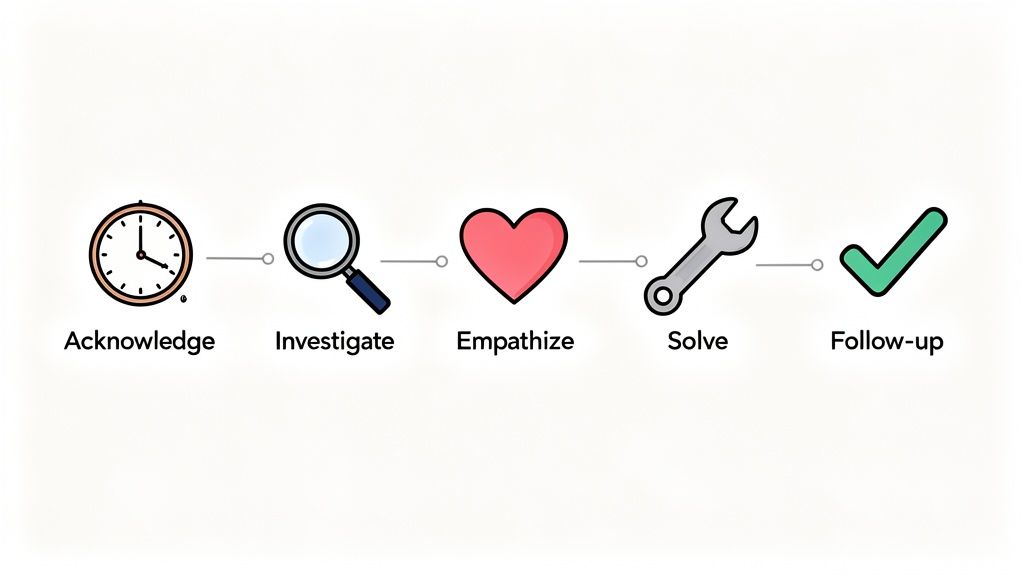
Knowing you should respond is one thing; knowing exactly how is another. A knee-jerk, defensive reply can actually do more harm than the original comment. The trick is to have a clear, repeatable process that guides you from that initial gut-punch feeling to a calm, professional, and genuinely helpful resolution.
This isn’t about having robotic scripts ready to go. It’s about creating a structure that ensures you cover all the essential bases while still sounding like you, even when you're under pressure. A good framework keeps you focused on the real goal: making the customer feel heard and valued.
Acknowledge Promptly
Speed really matters here. Study after study shows that customers expect fast replies, especially on social media where the window can be less than an hour. A quick acknowledgement—even if you don't have the final answer yet—shows you're paying attention and that their complaint hasn't just disappeared into a void.
This doesn't mean you need a perfect solution in five minutes. A simple, "Thanks for bringing this to our attention, [Name]. We're looking into this right now and will get back to you shortly," is often all it takes. It buys you crucial time to investigate properly without leaving the customer hanging.
This is where a tool like ForumScout can be a game-changer. Instead of stumbling across a complaint hours or days late, you get instant alerts. Its AI-powered filtering flags the urgent, high-priority mentions immediately, so your team can jump in and acknowledge the issue before it starts to gain traction.
Investigate Internally
Before you can offer a real solution, you need to understand what actually happened. This is your fact-finding stage. Was it a genuine product bug? A simple misunderstanding with a support agent? A service outage that affected multiple users?
Now's the time to gather all the necessary context. This might mean: * Checking your CRM records: Has this customer reported this issue before? * Talking to the team: Get the story from the support or sales reps who were involved. * Replicating the issue: If it's a technical bug, see if your engineering team can reproduce it.
Rushing to a conclusion without all the facts is a recipe for disaster. You might apologise for the wrong thing, offer an irrelevant solution, or worse, incorrectly blame the customer. A thorough but swift investigation is non-negotiable.
Empathise Genuinely
Once you have the facts straight, your next move is to connect on a human level. Empathy isn't just about dropping a clichéd, "I understand your frustration." It's about genuinely trying to see the situation from the customer's perspective and validating their feelings.
Imagine they spent hours trying to get a feature to work before a big deadline, only for it to fail. Their frustration is completely justified. Your response should reflect that understanding. Using phrases like, "That sounds incredibly frustrating," or "I can see why that would be so disappointing," shows that you're on their side. For a deeper dive, learning how to handle customer complaints effectively can give you more tactics for de-escalating tense situations.
Offer a Real Solution
An apology without any action is hollow. The customer wants a resolution, not just sympathy. Your offer should be specific, actionable, and directly address the problem they experienced. This is the moment you start to actually fix things.
What does a real solution look like?
- For a bug: "Our engineering team has identified the issue and is deploying a patch. We expect it to be live within the next two hours."
- For bad service: "The experience you described is not up to our standards. We are providing additional training to our team, and we'd like to offer you a credit for your trouble."
- For a missing feature: "While that feature isn't available right now, I've passed your feedback directly to our product team as they plan our next update."
Be completely clear about what you can and cannot do. Making a promise you can't keep will only destroy any trust you've managed to rebuild. Honesty is always the best policy here.
Follow Up After the Fact
Closing the loop is the final, and often forgotten, step. Following up a few days later shows that you genuinely care about the outcome and didn't just fire off a reply to close a support ticket. It demonstrates a long-term commitment to their satisfaction.
A simple check-in can make a huge impact. Think: "Hi [Name], just wanted to follow up and see if the fix we implemented has solved the problem for you." This proactive step can transform a negative experience into a memorable, positive one. It reinforces that their feedback led to real change and that their relationship with your brand matters. It's a powerful part of your community engagement strategies, helping turn a one-time complaint into a long-term conversation.
Adapting Your Response to Different Platforms
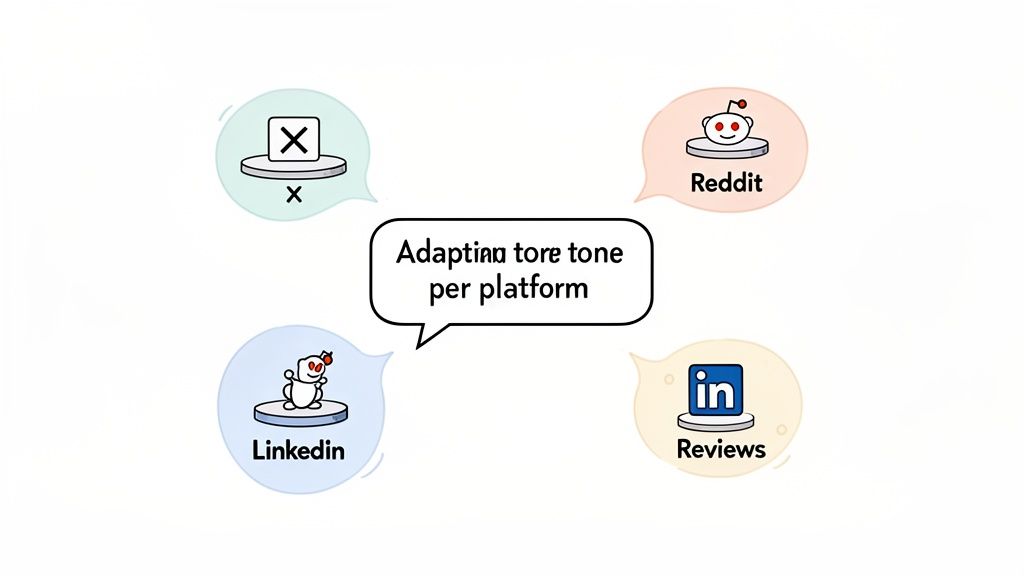
A one-size-fits-all response is a dead end. The way you handle a buttoned-up complaint on LinkedIn requires a completely different touch than navigating a casual, meme-filled thread on Reddit.
Each platform has its own unspoken rules, audience expectations, and conversational rhythm. Slapping the same canned reply everywhere is a surefire way to sound robotic and completely out of touch.
To really nail your response strategy, you have to become a chameleon, adapting your tone to fit the environment. The goal is to meet customers where they are, both digitally and emotionally. This shows you respect the community and makes your interaction feel genuine, not like a corporate box-ticking exercise.
Navigating High-Speed Social Media
Places like X (formerly Twitter) and Facebook are public squares, and they move incredibly fast. A complaint can catch fire in minutes, so your response time is critical. The main objective here is to acknowledge the issue swiftly and show everyone watching that you’re on it.
- X (Twitter): Keep it short and direct. Publicly acknowledging the user's tweet shows transparency. But be ready to shift the chat to Direct Messages (DMs) if you need personal details. This protects their privacy and pulls the heat off the public timeline.
- Facebook: You’ve got a bit more space to work with. Acknowledge the comment, show some empathy, and clearly lay out the next steps. Since Facebook is more community-focused, other users are definitely watching to see how you handle things.
Let's say a customer tweets, "@YourBrand my order arrived damaged and support isn't responding!" A great public reply would be: "Oh no, we're so sorry to see this! That's not the experience we want for you at all. Please send us a DM with your order number so we can make this right immediately."
Managing Formal Review Sites
On platforms like Google Reviews or Trustpilot, you’re speaking to two audiences: the person who left the review, and every potential customer who comes after them. These replies are more formal and permanent—they’re a public record of your customer service standards.
Your response needs to be structured and professional. Thank the reviewer by name, apologise for the specific issues they mentioned, and explain what you’re doing to fix the problem. This shows accountability and a real commitment to getting better.
A well-crafted reply on a review site can turn a one-star review into a powerful marketing asset. It demonstrates that even when things go wrong, your company is dedicated to finding a resolution.
This is where having a dedicated reputation monitoring service is so valuable. It helps you track these high-stakes reviews so nothing important ever slips through the cracks.
Engaging with Niche Communities
Community hubs like Reddit and industry-specific forums demand the most careful approach. Users here are often highly knowledgeable and have a finely tuned radar for corporate jargon. Authenticity is non-negotiable.
- Reddit: Every subreddit has its own unique culture. Before you even think about replying, spend a few minutes reading other posts to get the vibe. Be human, be transparent, and ditch the marketing speak. Often, the best move is to simply acknowledge the feedback, thank the user for their detailed thoughts, and have a real conversation.
- Industry Forums: The users here are experts. A vague, non-committal response will get you called out in a heartbeat. If it’s a technical issue, provide a detailed, technical explanation. Show them you genuinely respect their expertise.
Imagine a user on a gaming subreddit posts a detailed critique of a buggy update. A terrible response would be a generic, "Thanks for the feedback!" A fantastic response would be from a developer who says, "Great points here. The lag spike you mentioned is something we're actively investigating. The issue seems to be tied to X, and we're testing a potential fix now. We really appreciate the detailed breakdown."
This level of platform-specific adaptation is what separates brands that simply manage feedback from those that use it to build genuine relationships and loyalty.
Not every negative comment can be stamped out by the first person on the scene. Some problems are just too big, too technical, or too sensitive for a single community manager to handle alone. Figuring out when to call for backup is a critical part of any mature feedback strategy.
An effective escalation protocol isn’t about passing the buck. It’s about getting the problem in front of the person with the right expertise and authority to actually solve it. Without a clear plan, your front-line team is left hanging, and critical issues can fester, doing real damage to your reputation. This is where you shift from one-off replies to a coordinated, company-wide response.
Identifying Clear Escalation Triggers
Your team needs to know exactly when to raise the alarm. Any ambiguity just leads to hesitation. The best way to avoid this is by setting up concrete triggers that automatically kick off the escalation process.
These triggers usually fall into a few key buckets:
- Safety or Legal Concerns: Any mention of legal action, threats, harassment, or illegal activity needs to be escalated to your legal or leadership team immediately. This is non-negotiable.
- Major Technical Bugs: One user reporting a typo is one thing. A flood of comments about a core feature failing for everyone is a completely different beast. Widespread technical issues demand immediate escalation to the engineering or product lead.
- Brand-Level Crises: If negative feedback starts going viral, involves a high-profile influencer, or gets picked up by the media, it's no longer a support ticket. It’s a PR fire that needs executive oversight.
- Security Vulnerabilities: Any whisper of a data breach, privacy concern, or security flaw must be sent straight to your technical and leadership teams with the highest possible priority.
Building Your Escalation Matrix
Once you’ve defined your triggers, you need an escalation matrix. Think of it as a simple, easy-to-read chart that maps a specific problem to the right person or department. It removes all the guesswork and empowers your team to act fast.
A basic matrix might look something like this:
| Issue Type | Level 1 (Initial Contact) | Level 2 (Escalation) | Level 3 (Final Authority) |
|---|---|---|---|
| Product Bug | Customer Support Agent | Engineering Team Lead | Head of Product |
| Legal Threat | Community Manager | Legal Department | CEO / Leadership Team |
| Billing Error | Customer Support Agent | Finance Manager | Head of Finance |
This structure guarantees every issue has a clear path to resolution, with someone owning it at each stage. It also gives your team a safety net, allowing them to tackle tough conversations knowing a solid process has their back.
Remember, a well-defined escalation process is a form of internal feedback. It reveals where systemic issues lie and helps your entire organisation learn and adapt.
This isn't just about external feedback, either. For SMEs, PwC's UK Workforce Hopes and Fears Survey found that 73% of employees value great colleagues above almost anything else. So, when social listening tools flag internal grumblings about workplace culture, escalating those insights to HR can be the key to preventing top talent from walking out the door. You can read the full PwC survey findings to get a better handle on these trends.
Modern social listening tools like ForumScout can make this handoff seamless. Its collaboration features let you tag teammates directly on a mention and add internal notes, so all the original context is preserved. This saves the customer from having to repeat their story and helps the next team get up to speed in seconds.
Turning Feedback Insights Into Business Growth

Putting out the fire is just the start. The real power of negative feedback isn't just in damage control—it's in the data. Think of every single comment as a breadcrumb, leading you towards a stronger product, a smoother customer journey, or a smarter marketing strategy.
This is where you shift your mindset from reactive support to proactive intelligence gathering. When you handle feedback systematically, you turn a handful of scattered complaints into a powerful engine for genuine business growth. Stop seeing each comment as a one-off problem and start seeing it as part of a much bigger, more valuable picture.
Systematically Categorising Feedback
First things first, you need to bring some order to the chaos. You can't spot trends if all your feedback is just a jumble of disconnected conversations. The fix? A simple but effective categorisation system.
This doesn't have to be some overly engineered, complicated framework. A few core buckets will reveal a surprising amount.
- Product Flaws: Comments flagging bugs, missing features, or clunky design.
- User Experience (UX) Gaps: Feedback about a confusing checkout, a slow website, or difficult navigation.
- Customer Service Issues: Mentions of slow response times, unhelpful agents, or poor communication.
- Pricing and Billing: Complaints about cost, unexpected charges, or confusing subscription terms.
As you tag each piece of feedback, you're not just getting organised; you're building a database of your customers' biggest pain points.
When you can confidently say, "25% of all negative feedback last quarter was about our mobile checkout process," you’ve moved from anecdotal grumbles to hard, actionable data. That’s a conversation your product team can't ignore.
Uncovering Actionable Trends
Once your feedback is neatly categorised, the real fun begins. This is where you connect the dots and pinpoint the recurring themes that demand your attention. Are users on Reddit consistently getting tripped up by a specific feature? Are your Google reviews frequently mentioning long wait times for support?
These patterns are pure gold. They tell you exactly where to focus your resources for the biggest impact. If you notice a spike in complaints about delivery times right after switching couriers, you have a clear, data-backed reason to revisit that decision.
This isn't just about customer feedback, either. The same logic applies internally. In the UK, a recent report showed employee engagement scores jumped to 85.33% in early 2025—a significant rebound. This recovery shows how businesses that act on negative internal trends can create a more positive workplace. You can read the full analysis of 2025 employee engagement trends to see just how targeted interventions can make a real difference.
Measuring What Matters Most
To truly prove the value of your feedback strategy, you have to track the right metrics. These numbers are what turn your support function from a perceived cost centre into a strategic asset, showing exactly how your work impacts the bottom line.
Here’s a breakdown of the essential metrics you should be tracking to gauge how well your feedback management is performing.
Key Metrics for Measuring Response Effectiveness
| Metric | What It Measures | How to Track It (with ForumScout) | Target Benchmark |
|---|---|---|---|
| Response Time | The average time it takes your team to acknowledge a piece of feedback. | Use timestamp data from mentions to calculate the average time-to-first-reply. | Under 1 hour for critical social media; under 24 hours for forums/reviews. |
| Resolution Rate | The percentage of issues that are fully resolved to the customer's satisfaction. | Tag mentions with a "resolved" status and track the percentage over time. | Aim for 90% or higher. |
| Sentiment Score | The overall positive, negative, or neutral feeling associated with your brand mentions. | ForumScout’s dashboard automatically analyses and scores the sentiment of every mention. | A steady upward trend in your positive-to-negative ratio. |
| Feedback-to-Action Rate | The percentage of feedback trends that result in a documented product or process change. | Manually track this by linking trend reports to specific internal tickets (e.g., in Jira). | Aim for at least 1 actionable change per quarter based on feedback trends. |
Keeping a close eye on these numbers gives you a real-time dashboard for the health of your customer relationships.
Using the analytics inside a tool like ForumScout can automate a lot of this heavy lifting. It offers a deep dive into the nuances of online conversations, and our guide on sentiment analysis for social media explains exactly how this technology works its magic.
Turning Support Into a Strategic Hub
When you combine systematic categorisation with robust analytics, your customer support team transforms. It’s no longer just a department for handling complaints; it becomes a strategic intelligence hub that feeds vital insights back into every corner of the business.
Your reports can directly inform:
- Product Roadmaps: By highlighting the most requested features or frustrating bugs.
- Marketing Campaigns: By revealing the exact language customers use to describe their problems.
- Leadership Decisions: By providing a real-time pulse on customer and employee satisfaction.
Ultimately, this whole process is about showing people you’re not just listening—you’re acting on what you hear. When customers see their feedback lead to tangible improvements, you build a level of trust and loyalty that no marketing campaign could ever buy. Each thoughtful response is a deposit in the bank that helps you improve customer satisfaction and drive sustainable growth.
Common Questions About Handling Negative Feedback
Even with a solid game plan, you're going to run into tricky situations. That’s just the nature of dealing with customer feedback. Over the years, I've seen teams wrestle with the same tough questions as they figure out their response strategy.
Think of this section as a quick reference for those grey areas—the moments you’re not quite sure what the right move is. Here are some straight answers to those common sticking points.
What If the Feedback Is Just Plain Wrong?
It’s maddening when a customer leaves a scathing review that’s factually incorrect. Your first instinct is probably to jump in and correct them, point by point. Don't do it.
Arguing in public, even when you're 100% right, almost always makes you look defensive and petty. Onlookers don't have the full context; they just see a brand bickering with a customer.
The best approach is to take the high road. Acknowledge their frustration, express regret that you didn't meet their expectations, and then gently correct the record without making them feel stupid.
Here’s a real-world example: A user posts, "Your software is useless, it doesn't even have an export feature." But... it does.
Instead of a blunt correction, try something like this:
"Hi [Name], I'm really sorry to hear you had a frustrating time finding what you needed. I can see how our export feature might be hard to spot—it’s tucked away in the 'Project Settings' menu. We really appreciate you flagging this, as it’s a clear sign we need to make it more visible. Thanks for the feedback!"
See the difference? This response validates their feeling (it was hard to find) while correcting the mistake. You’ve turned a potential fight into a constructive chat about user experience.
Should I Really Respond to Every Single Negative Comment?
The short answer: pretty much, yes. In a world where customers are always watching, silence looks a lot like indifference. Responding to nearly every piece of negative feedback shows you're listening and that you actually care.
Research backs this up. One study found that 91% of travellers feel accommodation owners should reply to negative reviews, and a polite response improves their overall impression.
That said, there are a few rare exceptions where you should hold back. Don't engage with comments that are: * Obvious spam or totally irrelevant: Replying just bumps them up the page. Ignore and report. * Abusive or threatening: Never engage. Report the comment to the platform immediately and block the user. Your team's safety comes first. * Clear trolling: Some people just want to start a fire. Responding only gives them the fuel they're looking for.
For everything else, a thoughtful response is your best move. It shows potential customers that you’re attentive and willing to sort things out.
When Is It Okay to Delete a Negative Comment?
This is a very slippery slope. The simple answer is: almost never.
Deleting negative feedback from platforms you control, like your own blog or Facebook page, is a massive breach of trust. The moment people realise you're only showing the good stuff, your credibility is shot.
The only time it's acceptable to delete a comment is when it violates your community guidelines, which should be clearly posted. This usually includes things like hate speech, discrimination, doxxing (sharing private info), or explicit content. In these cases, you aren't censoring criticism; you're moderating a safe community space.
If you do have to remove a comment, it's good practice to send the user a private message explaining which rule they broke. When in doubt, transparency is always the right call.
Trying to keep an eye on every comment and question across the web is a huge task. ForumScout makes it manageable by tracking mentions on Reddit, X, forums, and news sites. It sends smart alerts so you never miss a conversation that matters. Start your free 7-day trial of ForumScout today and take control of your brand's narrative.