- 18 min read
What Is Google Alerts A Guide to Brand Monitoring
Think of Google Alerts as your own personal scout for the internet. Itâs a completely free service that sends you an email whenever a new web page, news article, or blog post pops up mentioning a keyword you care about. In short, it's like a digital clipping service for the entire web.
Your Personal Digital Scout Explained

Imagine trying to keep tabs on every mention of your brand, your name, or a specific topic across the vastness of the internet. It would be an impossible, full-time job. Thatâs the exact problem Google Alerts was built to solve. You just tell it what to look for, and it drops relevant links straight into your inbox.
This clever tool automates the grind of searching Google for new content. Instead of you having to remember to check for updates every day, Google does the legwork and lets you know when it finds something new.
For a quick overview of what Google Alerts brings to the table, hereâs a simple breakdown of its core features.
Google Alerts at a Glance
| Feature | Description |
|---|---|
| Keyword Monitoring | Tracks specific keywords, phrases, brand names, or competitor names across the web. |
| Source Filtering | Lets you narrow down alerts to specific sources like news, blogs, or web pages. |
| Email Notifications | Delivers new mentions directly to your email inbox at your chosen frequency. |
| Frequency Control | You can decide to get alerts as-it-happens, once a day, or once a week. |
| Free to Use | There's no cost and no limit to the number of alerts you can create. |
This table shows just how straightforward the service isâitâs designed for simplicity and ease of use, making it accessible for anyone.
What Does Google Alerts Actually Monitor?
The service is powerful because it taps into the wide range of content that Google indexes every day. While itâs not completely exhaustive, it covers the most common places youâd want to keep an eye on for general awareness.
Key sources include:
- News websites and major online publications.
- Blogs from both companies and individuals.
- Web pages that are publicly indexed and accessible.
- Discussions and forums that show up in Google's search results.
Launched way back in 2003, Google Alerts has long been a go-to for UK businesses wanting to keep an eye on their brand mentions. In the UK, where Google holds a massive 82.35% market share in search as of 2025, Alerts has a huge pool of data to draw from. However, its reliance on Google's own indexing schedule means it can be a bit slow for real-time needs, especially when compared to modern social listening tools. You can read more about Google's dominance in the UK search market for context.
In essence, Google Alerts transforms a reactive search process into a proactive notification system. Itâs your first step towards understanding what is being said about you online, without lifting a finger.
How to Set Up Your First Google Alert
Getting your first Google Alert up and running is surprisingly simple. It takes just a few minutes, but it opens the door to a constant flow of information tailored just for you. The whole process is designed to be intuitive, letting you go from a vague idea to a precise notification system with only a couple of clicks. Let's walk through it.

First things first, head over to the official Google Alerts homepage. You'll land on a clean, minimalist page with a search bar right at the top. This is where it all begins.
Just type the word or phrase you want to keep an eye on into that search bar. This could be your own brand, a competitor's name, or just a topic you're curious about. As you type, Google gives you a live preview of the kinds of results you can expect, which is a neat touch.
Customising Your Alert Settings
Before you hit that final button, look for the "Show options" link. This is where the magic happens, letting you fine-tune your alerts so you only get the good stuff. Clicking it opens up a few settings, and each one plays a big part in how useful your results will be.
For a deeper dive, you can also check out our complete guide on how to set up Google Alerts.
Hereâs a quick rundown of what each option does:
- How often: This sets the pace of your email updates. "As-it-happens" is brilliant for urgent things like brand crisis monitoring. "At most once a day" gives you a tidy daily summary, while "At most once a week" is perfect for tracking broader trends without cluttering your inbox.
- Sources: By default, Google scans everything from news to blogs and the wider web. You can narrow this down to just "News" or "Blogs" if you want to filter out chatter from other places.
- Language & Region: These settings are a lifesaver for local businesses or global brands. You can focus your alerts on specific countries or languages, making your results far more relevant.
- How many: You can choose between "Only the best results," where Googleâs algorithm does the filtering for you, or "All results" if youâre a completist who wants to see every single mention.
Once youâve dialled in the settings, just pop in your email address and click the big "Create Alert" button. Thatâs it. Your first alert is officially live and on duty.
Pro Tips for Better Results
To really get the most out of Google Alerts, you need to think beyond simple keywords. A few clever search operators can slash the noise and make your notifications incredibly accurate.
The real power of Google Alerts is unlocked not by what you track, but by how you track it. Precise operators turn a noisy feed into a stream of actionable intelligence.
Try using these operators in the search bar:
- "Exact Phrase": Pop quotation marks around your keywords (e.g., "ForumScout social listening") to find mentions of that exact phrase. No more, no less.
- -Exclusions: Add a minus sign before a word you want to ignore (e.g., "customer service" -jobs). This is perfect for filtering out all those irrelevant job postings.
- site:: Want to monitor a specific website? Use site:reddit.com "your keyword" to get alerts only from that one domain.
By mixing these simple but powerful tricks with the basic setup, you can transform Google Alerts from a handy notification tool into a seriously targeted monitoring asset for your brand.
Putting Google Alerts to Work for Your Business

Okay, so you've got the setup down. But the real magic happens when you start applying Google Alerts to actual business goals. Think of it less as a simple notification tool and more as a free source of business intelligence that can sharpen your marketing, protect your reputation, and give you a leg up on the competition.
Once you grasp what is Google Alerts in a strategic sense, it shifts from a passive feed to an active system for sniffing out opportunities. The secret is creating targeted alerts that are tied directly to what youâre trying to achieve.
Monitor Your Brand and Manage Your Reputation
One of the most valuable ways to use Google Alerts is to keep a constant eye on your brand's online presence. By setting up alerts for your company name, product names, and even key executives, you'll know the moment you're mentioned online.
This kind of proactive monitoring means you can:
- Catch negative feedback early. An alert for a bad review on some blog gives you the chance to jump in, respond quickly, and sort out customer issues before they blow up.
- Discover positive testimonials. When you spot glowing reviews or positive shout-outs, you can share them on social media or pop them on your website as social proof.
- Identify unlinked brand mentions. If a website mentions your company but doesn't link to you, thatâs a golden opportunity. A quick email asking for a backlink can give your SEO a nice little boost.
Comprehensive brand monitoring is a non-negotiable these days. To see what more advanced tools can do, it's worth exploring what a professional reputation monitoring service offers.
Track Competitors and Industry Trends
Knowing what your competitors are up to is crucial for staying ahead of the curve. Google Alerts can act as your own personal corporate spy, delivering intel straight to your inbox. You can easily track their new product launches, PR campaigns, and even pricing changes.
For example, a marketing agency could set an alert for a competitorâs brand name plus the word âreviewâ. This lets them see what clients are saying about the competition, revealing potential weaknesses they can bring up in their own sales pitches.
By monitoring the conversation around your competitors, you gain a strategic advantage. You can react to their moves, anticipate market shifts, and even learn from their mistakes without spending a penny.
On top of that, tracking broad industry keywords helps you stay on top of emerging trends and regulatory changes. It's a simple way to keep your business agile and well-informed.
Uncover New Leads and Content Ideas
Believe it or not, Google Alerts can also be a surprisingly effective tool for finding new leads. All you have to do is think about the specific phrases potential customers might use when they're looking for help. This lets you capture buying signals from all over the web.
Imagine a local accounting firm in Manchester. They could set up an alert for "small business accountant recommendations Manchester". When someone posts that question on a public forum that Google indexes, the firm gets a notification. They can then jump into the conversation and offer their expertise.
This exact method works for creating content, too. Set up alerts for common questions in your industry. If you keep seeing alerts for things like "how to choose the right SEO software," you know thatâs a topic your audience is desperate to learn about. Boomâthereâs the idea for your next blog post.
The Critical Limitations You Must Understand
While the appeal of a free tool is strong, relying solely on Google Alerts for any serious monitoring is a risky game. It's a fantastic starting point, but you need to know its limitations to avoid a false sense of security. Its biggest weakness isn't a minor flaw; it's a fundamental gap that can leave your brand completely exposed.
The most glaring issue is the delay in notifications. Google Alerts is not a real-time service. It works by pinging you only after Google has indexed a new web page, a process that can take hours or even days. In a world where a negative story or customer complaint can go viral in minutes, this delay is a massive liability.
The Social Media Blind Spot
This time lag is especially dangerous when it comes to social media, which is largely a blind spot for the service. The fast-paced, critical conversations shaping your brand's reputation happen on platforms that Google Alerts just doesn't cover effectively.
Key platforms it misses include:
- Reddit: A goldmine for honest product feedback and niche communities where buying decisions are heavily influenced.
- X (formerly Twitter): The epicentre of breaking news and real-time customer service meltdowns.
- LinkedIn: The primary network for B2B chatter, competitor intelligence, and professional brand-building.
By missing these conversations, you're essentially ignoring the modern-day town square. You won't hear about customer complaints until they escalate, miss out on priceless feedback, and remain oblivious to leads asking for recommendations your product could solve.
A monitoring strategy that ignores social media is like trying to gauge public opinion by only reading last week's newspapers. You're missing the immediate, unfiltered voice of your audience where it matters most.
No AnalyticsâJust Raw Data
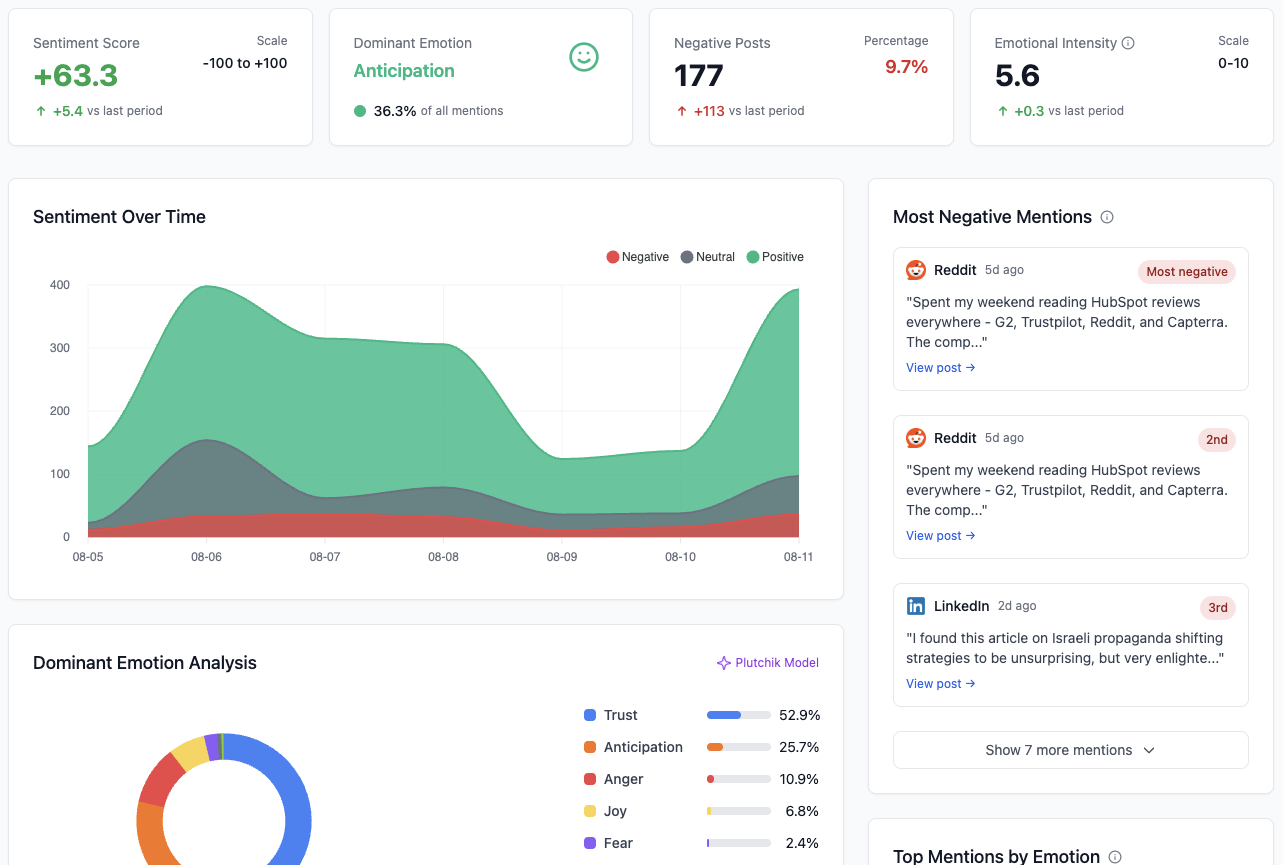
Another deal-breaker is the complete absence of analytics. Google Alerts delivers a raw, unfiltered stream of links with zero context. You get a list of mentions, but the tool gives you no way to understand their impact.
Thereâs no sentiment analysis to tell you if a mention is positive, negative, or neutral. You get no metrics to track how often you're being mentioned over time or to see which sources are driving the most conversation. This leaves your team with the soul-destroying task of manually clicking every link, reading every article, and trying to piece together the bigger picture. This manual slog quickly erodes the value of a "free" tool.
The raw data dump requires hours of work to become anything close to actionable intelligence, making it impractical for any business needing to make swift, informed decisions.
A Glaring Example of Delayed Reactions
The need for real-time monitoring is constantly highlighted in public trends. For example, UK search trends in 2025 were dominated by fast-moving events like searches for 'Ozzy Osbourne' and 'snow warning'. These topics saw traffic surges of over 300% within hours, driven by immediate public emotion and events. A tool like Google Alerts, with its indexing delays, would report on these conversations long after they had peaked, making any response far too late to be relevant. You can explore more about how UK search trends reflect real-time events on itv.com.
Ultimately, these drawbacks frame Google Alerts not as a comprehensive monitoring solution, but as a basic notification service with major gaps. For any business serious about reputation management, lead generation, or competitive analysis, these limitations can directly translate into missed opportunities and preventable crises.
It's clear that for serious, real-time tracking, you need something more powerful. Hereâs a quick breakdown of how a dedicated social listening tool stacks up against Google's free offering.
Google Alerts vs Modern Social Listening Tools
| Feature | Google Alerts | ForumScout |
|---|---|---|
| Real-Time Alerts | No (Delayed by hours or days) | Yes (Instant notifications) |
| Social Media Coverage | Almost none | Extensive (Reddit, X, LinkedIn, etc.) |
| Forum Monitoring | Very limited and unreliable | Comprehensive |
| Sentiment Analysis | None | Yes (Positive, negative, neutral) |
| Analytics & Reporting | None | Yes (Trend tracking, source analysis) |
| Filtering & Noise Reduction | Basic keyword filtering | Advanced AI and rule-based filters |
| Lead Generation | No | Yes (Identifies buying signals) |
As you can see, the difference isn't just about a few extra featuresâit's about getting the timely, contextualised information you need to make smart decisions. While Google Alerts is a handy free tool for casual keyword tracking, it falls short the moment your monitoring needs become critical.
When to Upgrade to a Smarter Alternative

Google Alerts is a brilliant starting point for anyone dipping their toes into online monitoring. Itâs free, itâs simple, and it gets the job doneâto a point. But for any growing business, there comes a time when "good enough" stops being good enough.
So, how do you know when youâve officially outgrown it? The answer usually lies in your goals. If you've shifted from passively collecting mentions to actively hunting for opportunities, you've probably hit the ceiling. The moment you need to act on what people are saying online, itâs time for an upgrade.
Key Triggers Signalling an Upgrade
Think about what youâre trying to achieve day-to-day. Are you wrestling with tasks that Google Alerts was never designed to handle? If any of these scenarios feel familiar, itâs a clear sign you need something with more horsepower.
You need to upgrade when you must:
- Respond to customer support issues in real-time. Waiting hours for an email digest about a frustrated customer on Reddit or X is a recipe for disaster. A dedicated tool gives you instant notifications, letting you jump in before a minor grumble becomes a major crisis.
- Analyse brand sentiment at scale. A raw list of links can't tell you if people love or loathe your latest product launch. You need AI-powered sentiment analysis to get a true read on public opinion without manually sifting through every mention.
- Measure your share of voice against competitors. To truly understand your place in the market, you need analytics that stack your mention volume and sentiment directly against your rivals.
- Find qualified leads on social media and forums. If youâre searching for buying signals like, âcan anyone recommend a good tool for X?â, you need a system that actively finds these conversations on platforms Google Alerts completely misses.
These triggers mark the shift from passive monitoring to an active business intelligence strategy. When your needs grow beyond basic notifications, a dedicated sales intelligence platform can provide the depth and automation youâre missing.
Introducing a Smarter Monitoring Strategy
This is exactly where a social listening tool like ForumScout steps in. Itâs built to fill the gaps left by Google Alerts, transforming a stream of noisy data into insights that can actually grow your business.
Upgrading from Google Alerts to a social listening platform is like switching from a basic smoke detector to a full security system. One tells you there might be a fire somewhere, while the other gives you a real-time video feed of exactly what's happening and where.
ForumScout delivers what a free service can't: real-time updates from a massive range of sources, including full coverage of Reddit, X (formerly Twitter), LinkedIn, and thousands of online forums. Its AI-powered analytics automatically sort mentions by sentiment and relevance, saving you hours of manual filtering.
You can finally stop just collecting data and start using it to find leads, manage your reputation, and stay one step ahead of the competition. For a deeper look, check out our complete guide on finding the perfect Google Alerts alternative.
Even in the UK, where Google has held over 90% of the search market since 2018, the technical limits of Alerts are clear. While it's easy to customise for region, itâs simply outmatched by modern tools that use AI to deliver smart, contextual notifications instead of a simple email digest. The return on investment becomes obvious: you gain the speed and intelligence to act on opportunities before they vanish.
A Few Common Questions About Google Alerts
Even after you get the hang of Google Alerts, a few questions tend to crop up. Letâs clear up some of the most common ones to help you get the most out of the tool and understand where it fits in your strategy.
Is Google Alerts Really Free?
Yes, Google Alerts is 100% free. All you need is a Google account to start setting up your trackers and getting email notifications. There are no hidden fees, subscriptions, or limits on how many alerts you create.
This makes it a fantastic, no-risk way for any business to get started with monitoring. The only real âcostâ is what you might miss out on due to its delays and total blind spot when it comes to social media.
Why Did My Google Alerts Stop Working?
If your alerts suddenly dry up, a few usual suspects are likely to blame. First things first, check your spam or junk folder. It's surprisingly common for email services to misfile the notifications, so always look there before you panic.
Next, think about your search query. Is it too specific or niche? If nobody is creating new content that Google can index with your exact phrase, you won't get any alerts. Try making your keywords a bit broader to see if that gets the ball rolling. Finally, the service can just be a bit buggy sometimes. A quick fix is to edit your alertâmaybe change the delivery frequencyâwhich often gives it the nudge it needs to start working again.
The number one reason for not getting alerts is a query that's too narrow. Think like Google: if thereâs no new content with those exact words, thereâs nothing to send you.
Can Google Alerts Track Social Media Like Reddit or X?
No, and this is its biggest drawback for anyone serious about brand monitoring today. Google Alerts only keeps an eye on content indexed by Google Search, which mostly means news sites, blogs, and public websites. It completely misses the fast-paced, candid conversations happening on social platforms.
This means youâre blind to almost all the chatter on:
- Reddit, where people share brutally honest feedback about products.
- X (formerly Twitter), the go-to place for breaking news and instant customer reactions.
- LinkedIn, where industry leaders and B2B decision-makers are talking shop.
If you need to know whatâs being said on these channels, a proper social listening tool isnât just nice to haveâitâs essential.
How Do I Get Better, More Accurate Alerts?
The secret to better alerts is using search operators to tell Google exactly what you want, cutting out all the irrelevant noise. Instead of just plugging in a keyword, you can give it more precise commands.
For example, wrap your brand name in "quotation marks" to find that exact phrase. Use a minus sign (-) to get rid of terms you don't want (like "ForumScout" -jobs). You can even use 'site:website.com' to only track mentions on a specific website. When you combine these tricks with the built-in filters for source and region, the quality of your alerts will improve dramatically.
Ready to move beyond the limitations and get real-time, actionable insights from social media and forums? ForumScout delivers instant alerts from Reddit, X, LinkedIn, and more, with AI-powered analytics to turn mentions into revenue. Start your free 7-day trial of ForumScout today.